You've probably got the same problem right now, a founder wants a pricing feed, the growth team wants SERP monitoring, and engineering doesn't want to spend another quarter babysitting a brittle scraper. The first script looked fine. Then the site changed a class name, a CAPTCHA started showing up, and the “quick win” turned into a recurring maintenance job. A web scraping API is the point where teams stop treating extraction like a side project and start treating it like infrastructure.
The shift isn't just convenience. It's moving from hand-rolled request logic to a managed layer that handles access, rendering, pacing, and structured output, so the team can keep shipping product work instead of patching parsers. That matters now because the broader web scraping market has crossed the billion-dollar mark and is still expanding, with independent 2026 estimates placing it at about USD 1.34 billion in 2025, rising to USD 1.56 billion in 2026 and projected to reach USD 3.49 billion by 2031 at a 17.39% CAGR (Proxyway research on the web scraping API market). For startup teams, this isn't a niche workaround anymore, it's part of the data stack.
Table of Contents
- The Hidden Costs of DIY Data Extraction
- How Managed Extraction Architecture Works
- Designing AI-Ready Data Pipelines
- How Context.dev Can Help
- Evaluating Build vs Buy Trade-Offs
- Navigating Compliance and Bot Defenses
- Integration Patterns and Code Workflows
- Selecting the Right Vendor for Your Stack
The Hidden Costs of DIY Data Extraction
A DIY scraper usually begins as a clean little win. Someone writes a Python script with requests and Beautiful Soup, pulls a few fields, and gets a dashboard populated before lunch. Then the target site changes its markup, the script starts returning partial pages, and one engineer ends up on permanent scraper duty.
That's the trap. The code rarely fails loudly in the first hour, it fails in maintenance. Every DOM update, blocked IP range, CAPTCHA, or JavaScript-rendered page adds another layer of glue code, retry logic, and exception handling.

Where the engineering time goes
The hidden cost isn't just the scraper itself, it's the surrounding work. You need proxy rotation, header tuning, browser emulation for dynamic pages, and a way to tell whether a bad result means the site changed or your parser did. That's why managed extraction became a category in the first place.
The historical arc is straightforward. Web scraping APIs moved from simple request wrappers into managed services that are benchmarked on success rate and response time. In 2026 benchmarking, providers landed anywhere from 80.10% to 98.44% success rate, with Bright Data at 98.44%, Zyte at 93.44%, Oxylabs at 86.82%, Decodo at 86.08%, and NetNut at 80.10% (GIIR research summary). That shift matters because it turns extraction into something you can evaluate instead of just hope for.
Practical rule: if one engineer can't explain why a scraper failed in under a few minutes, the scraper has already become infrastructure, whether you planned for it or not.
The other issue is opportunity cost. A startup usually doesn't lose because it can't write one scraper, it loses because good engineers keep revisiting old scrapers instead of building the product that differentiates the company. Managed APIs exist to push that work down a layer.
How Managed Extraction Architecture Works
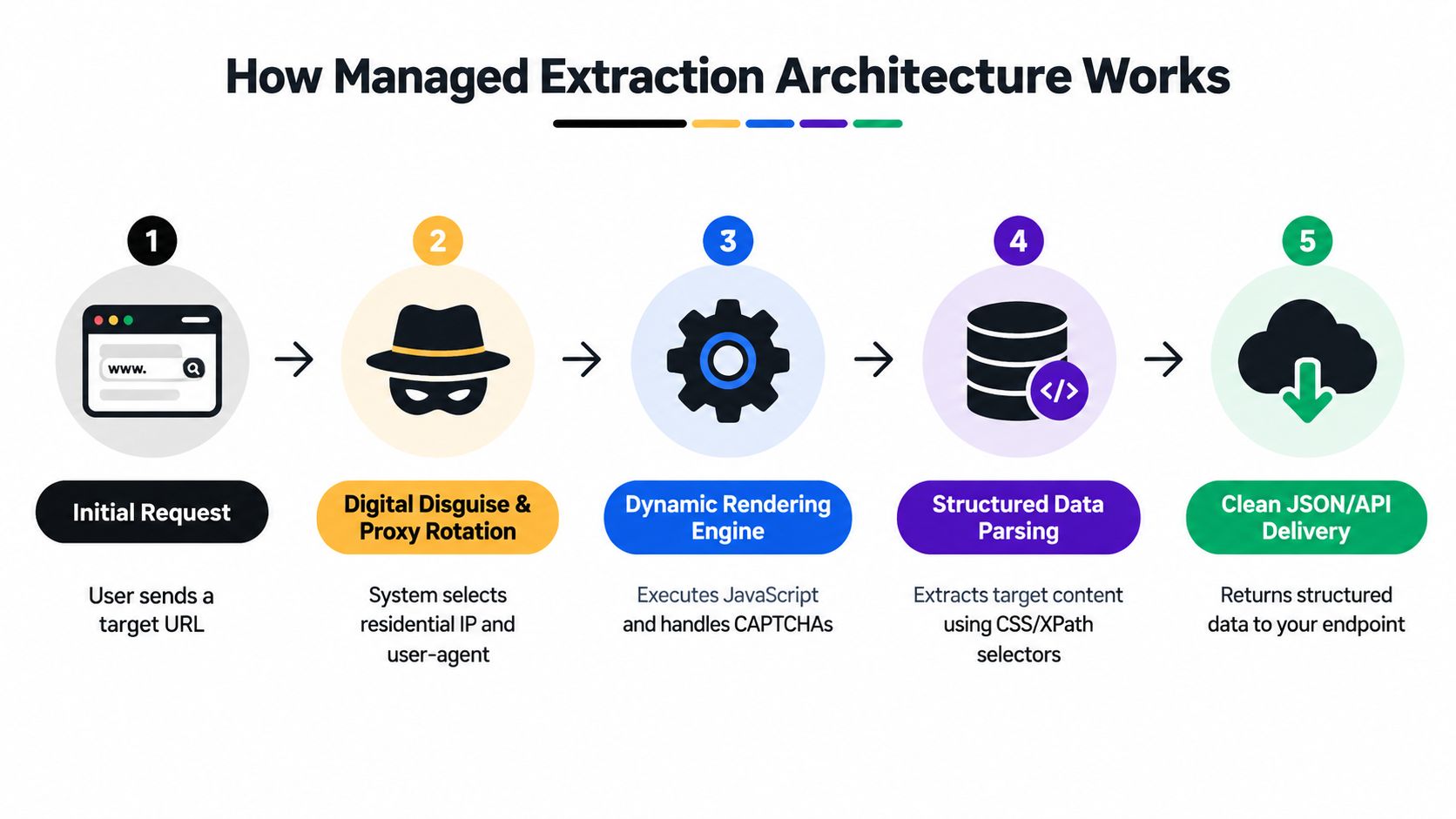
A modern scraping API behaves less like a library and more like a digital disguise and delivery service. You send a URL. The service decides how to fetch it, which identity to present, whether the page needs a browser, and how to return the result in a usable format.
That's a better mental model than “proxy plus parser.” The service sits between your application and the target site, absorbs the ugly parts of the handshake, and hands back a response your system can use.
The request lifecycle
Step one is the request itself. Your app sends a target URL, maybe with parameters that say whether you want rendered HTML, JSON, or plain text. Step two is routing, where the platform chooses an access path through its proxy pool and sets headers that fit the target environment.
Step three is rendering when needed. If the page depends on JavaScript, the service spins up a browser environment and executes the page like a real user would. That's the practical difference between a simple fetcher and a managed extraction platform.
Why the middle layer matters
The hard part isn't fetching bytes, it's surviving modern anti-bot systems. Providers now combine proxy access, TLS fingerprint handling, browser rendering, and parsing in one flow. Independent 2026 benchmark coverage has shown practical tradeoffs between speed and coverage, for example Scrape.do at 98.61% success with 5.5s average response time, Apify at 97.14% with 14.2s, and Bright Data at 98.44% in a separate benchmark summary (Scrape.do benchmark review).
That's the core lesson. There isn't one universal winner. A latency-sensitive workflow might prefer a faster provider, while a heavily protected target might justify slower responses if coverage is better. In both cases, the API hides queueing, pacing, and retry handling behind a single request surface.
What happens under load
Benchmarks that look good at low volume can degrade under concurrency. Proxyway-based 2026 analyses evaluated vendors at different request rates, including 2 requests/sec and 10 requests/sec, because throughput changes the shape of failure (Zyte's 2026 API benchmark discussion). That matters because your production traffic won't behave like a demo.
The right API isn't the one with the prettiest landing page. It's the one that still works when your job runner spikes, the target site gets stricter, and your retry queue starts filling up.
Designing AI-Ready Data Pipelines
Most scraping content still obsesses over bypassing blocks. That's useful, but it's not the whole problem. Startup teams increasingly need extraction that drops straight into RAG pipelines, analytics tables, or agent workflows without a cleanup pass.
That's why the output format matters as much as the fetch itself. Raw HTML is fine for archiving, but it's poor input for downstream systems that want consistent fields, stable schemas, and minimal boilerplate.
Raw HTML is usually the wrong finish line
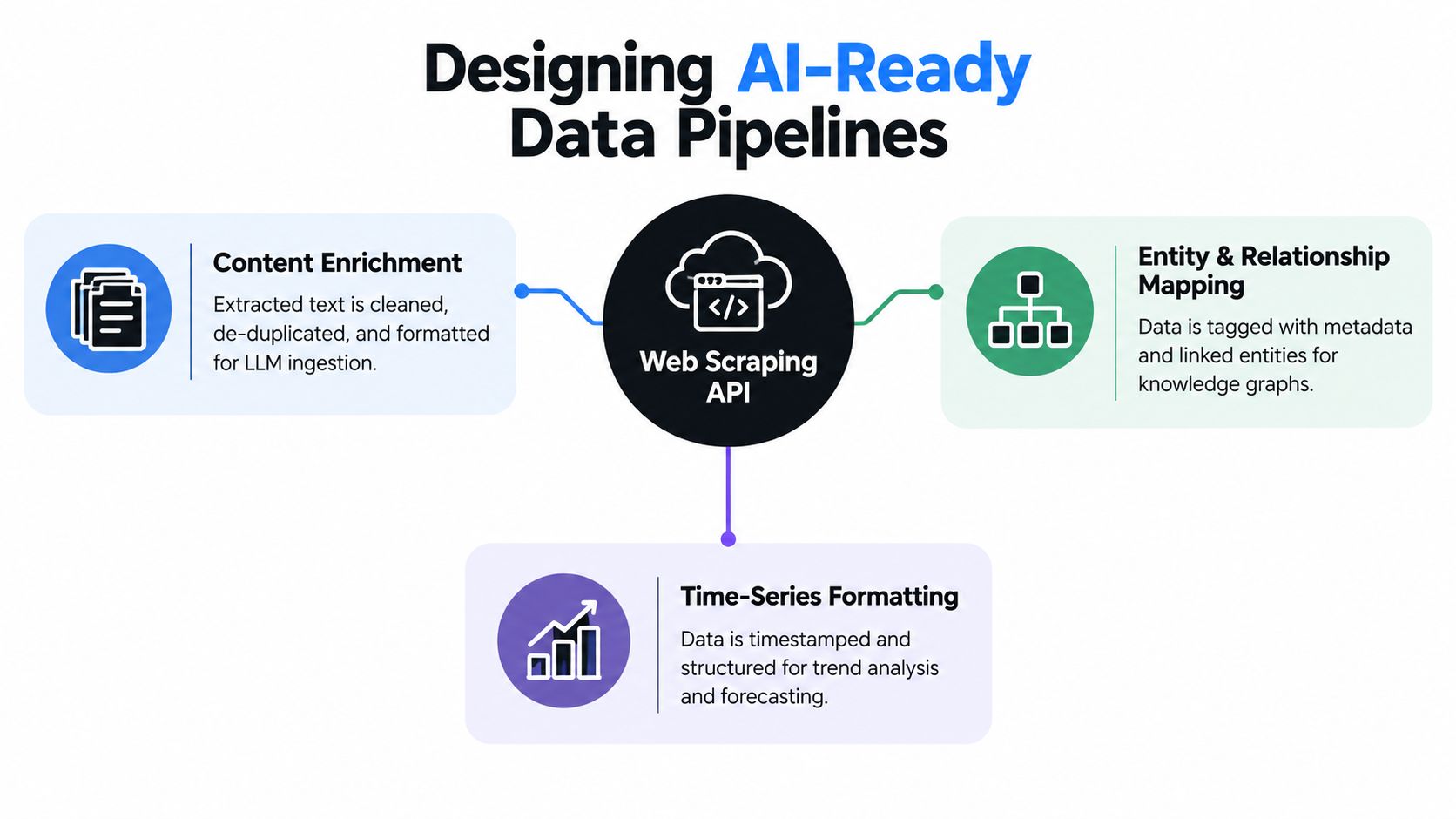
HTML is a transport format, not a usable business object. If you're feeding a vector store or a search index, you usually want cleaned markdown, a schema-locked JSON object, or a document with boilerplate stripped away. That reduces the amount of downstream parsing your team has to maintain.
The category is already splitting into infrastructure-first vendors and AI-native scrapers. The latter group is increasingly focused on semantic extraction, agent-friendly interfaces, and outputs that plug into RAG systems cleanly. That's the direction the market is moving in because AI use cases want structured content, not just access.
The best way to think about it is simple. If your team only needs a page snapshot, a fetch-only API may be enough. If the page output has to feed an embedding pipeline, a classifier, or an autonomous agent, the scraping layer should do more of the transformation work.
How to think about output shape
A good extraction design starts with the downstream consumer. If the consumer is a model, you want clean markdown or compact JSON. If it's analytics, you want stable field names and timestamps. If it's enrichment, you want entities and relationships, not document noise.
That's also where schema discipline matters. Prompt-only extraction can be useful during exploration, but the field names can drift. A schema-locked approach keeps the pipeline stable and makes failures easier to debug. Recent product coverage has also shown providers adding semantic extraction, MCP-style interfaces, and richer machine-readable outputs, which is exactly what AI teams have been asking for (Zylos research on AI-ready scraping).
For teams building AI features, the decision isn't “scrape or don't scrape.” It's whether the extraction layer should return a document, a record, or a knowledge artifact. That choice affects storage, retrieval, and maintenance more than most founders expect.
You can also map this thinking to internal product data work. The structure used for sales and marketing APIs in an internal data platform is a useful reference point for organizing scraped content into reusable objects, especially when the goal is enrichment rather than archival. A practical example is the internal project page for data platform APIs for sales and marketing, which fits the same mindset of transforming external data into something the product can use directly.
How Context.dev Can Help
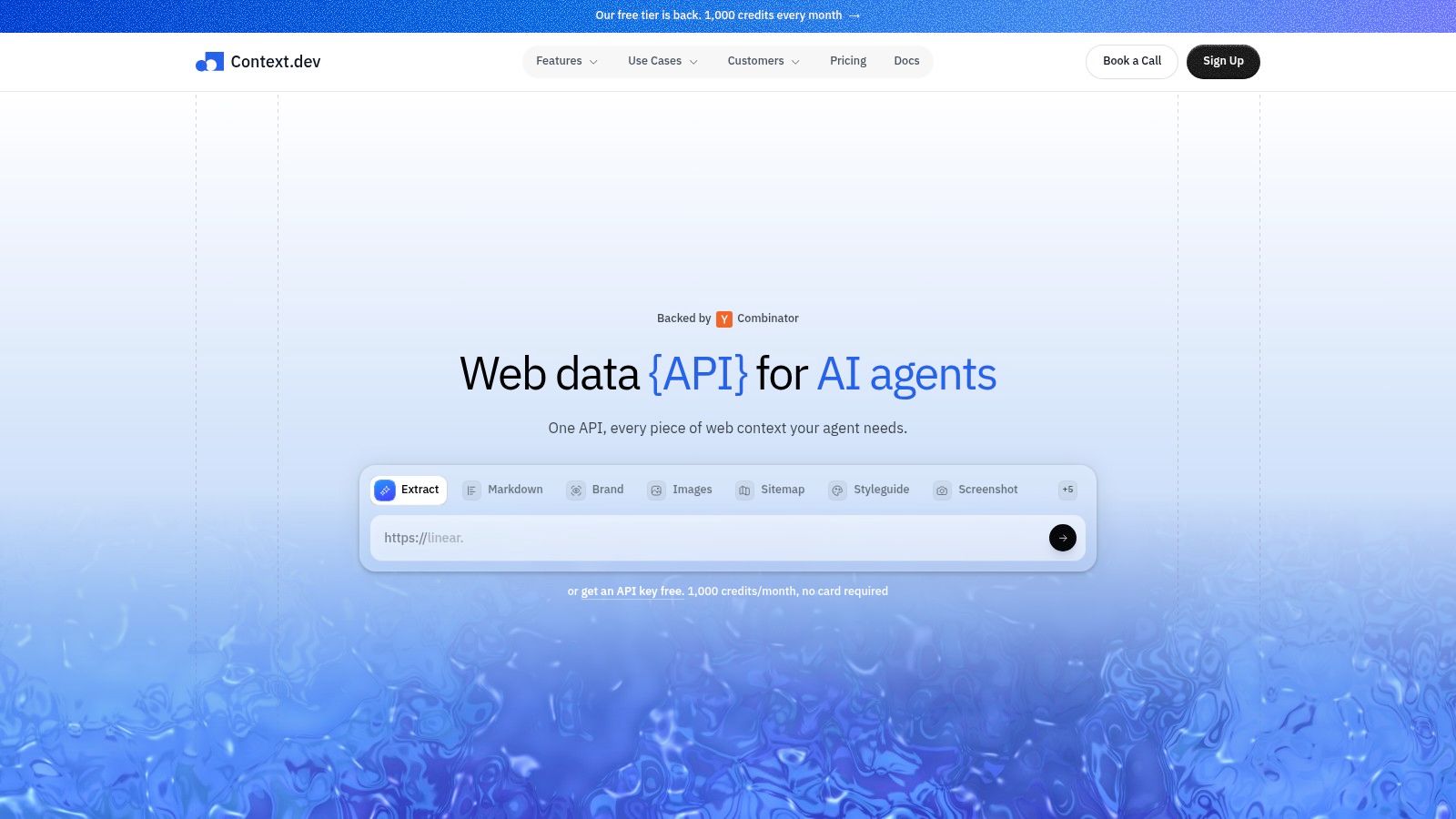
Context.dev is a Web Context API for teams that want structured data from the public web without stitching together a scraper, parser, screenshot service, and metadata extractor. It can return rendered HTML, clean LLM-ready Markdown, images, sitemaps, screenshots, and brand metadata by domain, email, name, or stock ticker.
Where it fits
For a startup team, the biggest value is consolidation. Instead of wiring together separate systems for page rendering, content cleanup, and brand enrichment, you get one API that can support agents, RAG pipelines, CRM enrichment, and onboarding flows. That makes it attractive when your output needs to be useful immediately, not after a second pass of normalization.
It's also relevant when the task is broader than scraping a single page. Context.dev can crawl sitemaps, capture screenshots, and retrieve brand signals that help personalize product experiences. Its AI Query feature is useful when you need custom entity extraction or product data, and its transaction identification helps map messy merchant descriptors to real-world brands.
The practical trade-off is straightforward. If your team only needs raw access, a lighter scraping tool may be enough. If you need rendered content plus structured context, especially for product features that depend on fresh web data, Context.dev is closer to a data enrichment layer than a pure scraper. If you want to evaluate it directly, the Context.dev Web Context API page is the right starting point.
Use managed scraping when the output needs to be consumed by another system the same day. Use a lighter tool only when you're sure the result won't need enrichment, caching, or brand context.
Evaluating Build vs Buy Trade-Offs
The build-versus-buy decision usually gets framed too narrowly. Engineers compare the code they can write this week against a vendor fee, but the comparison includes proxy procurement, server upkeep, browser automation, retries, monitoring, parser fixes, and the business cost of failures. DIY looks cheap until you count the labor required to keep it alive.
A managed service changes the cost model. Instead of paying for infrastructure you must maintain, you pay for usable extraction results and the operational handling around them.
| Factor | In-House Infrastructure | Managed Web Scraping API |
|---|---|---|
| Setup time | Requires proxy selection, browser handling, parsing logic, and monitoring | Starts with an endpoint and a few request parameters |
| Maintenance | Your team owns breakage, retries, and target-site changes | Vendor absorbs most infra churn |
| Reliability evaluation | Hard to measure consistently across targets | Benchmarks usually expose success rate and response time |
| Concurrency scaling | You own queueing, pacing, and load behavior | Concurrency is handled or capped by the provider |
| Output shape | Often raw HTML first, then custom parsing | Can return structured output directly |
| Compliance posture | Your team must define access rules carefully | Still your responsibility, but the vendor usually provides clearer platform controls |
What the table hides
The table simplifies one important point, compliance still sits with you. A vendor can reduce operational pain, but it doesn't remove your responsibility to decide what data you're allowed to collect and how you'll store it. That's where startup teams get into trouble when they confuse technical feasibility with legal permission.
Cost is also more nuanced than “API fee versus internal server.” Some teams should pay for managed extraction because the cost of a failed scrape is low, but the cost of a person debugging it is high. Others should build in-house because their targets are stable, their volume is predictable, and they already have parsing expertise.
A practical decision rule
If the target sites change often, the workflow needs browser rendering, or the output has to feed AI systems with low tolerance for dirty input, buy. If the target set is small, static, and internal to your business logic, build. If you're unsure, start with a managed API and treat the first quarter as an operational benchmark.
That last point matters for startups. The first version of a data pipeline is rarely the final one, and locking yourself into a brittle internal scraper too early can slow product iteration more than the vendor fee would.
Navigating Compliance and Bot Defenses
The compliance question is no longer theoretical. Publishers are hardening their defenses, and they're doing it at scale. Independent reporting by The Register coverage of publisher blocking trends showed 5.6 million websites had added GPTBot to disallow lists by late 2025, up from about 3.3 million at the start of July 2025, while Tollbit reported a 336% increase in sites blocking AI crawlers over the prior year and 13.26% of AI bot requests ignoring robots.txt in Q2 2025. The same reporting also noted that DataDome found in 2025 that 61.2% of more than 16,900 tested websites were unprotected, 36% partially protected, and only 2.8% fully protected.
What responsible scraping looks like
Respect published rules first. If a site's robots.txt policy or terms clearly prohibit your intended use, do not treat the problem as purely technical. Use a licensed feed, an official API, or another source of record.
Pacing comes next. Even when collection is allowed, aggressive request patterns can trigger blocking and hurt your IP reputation. Managed APIs help because they can pace requests, but your application still needs sane concurrency and retry settings.
Collect less data, not more. Pull only the fields you need, keep retention policies tight, and separate raw capture from production datasets. That lowers storage overhead and reduces compliance exposure.
How to read benchmark numbers correctly
A high success rate on easy targets does not prove the tool will hold up against enterprise-grade defenses. Benchmark method matters. Independent reviews have compared vendors under different load levels, and some providers perform well in one context but weaker in another. In one summary, ZenRows reached 99.00% success with 9.1s average response time, while ScraperAPI fell to 49.00% success with 36.0s on the same tested set (Zyte's benchmark discussion).
Compliance takeaway: build your plan around the data you are allowed to collect, then benchmark the API against your target mix. Do not reverse that order.
For startups handling public web data, the primary job is risk management. The right architecture lowers friction, but it does not replace judgment.
Integration Patterns and Code Workflows
The cleanest way to use a scraping API is inside a normal data pipeline, not as a one-off script. For startup teams, that usually means one of three patterns, a scheduled batch job for competitive pricing, a webhook-driven flow for SERP monitoring, or an asynchronous agent workflow for enrichment.
Batch jobs, webhooks, and agents
A batch job is the safest place to start. Run it on a schedule, collect a known set of URLs, and write the output into a warehouse table. That works well when freshness matters but instant updates do not.
A webhook-driven flow fits alerting. A change in the source system triggers a scrape, and the response pushes into Slack, email, or a dashboard. That pattern is useful for SERP changes, pricing moves, or product-page monitoring.
An agent workflow is more flexible. The agent decides which pages to inspect, asks the API for clean markdown or structured output, and then uses the result to enrich leads or answer questions. For that path, machine-readable output matters because it feeds RAG pipelines and other downstream AI systems without extra cleanup.
A basic production pattern
Keep credentials in a secrets manager, not in source control. Add retries for transient failures, but avoid infinite retry loops that turn bad jobs into cost leaks. Store the raw response separately from the normalized record so you can debug parser drift later.
For pagination, treat the API as a fetch primitive rather than a crawler that guesses the whole site. If the source has a page boundary, model that boundary explicitly. If the output is JSON, validate it before it hits your warehouse or vector database.
Here's the operational rule that saves time:
If downstream systems can't tolerate malformed rows, validate the response before you persist it. It is cheaper to reject one bad scrape than to repair a polluted table later.
A decision note for startup teams
Teams often overweigh headline success rates and underweigh shape stability. That is a mistake. The better question is whether the response can move cleanly into your warehouse, analytics stack, or retrieval layer without custom repair code.
That is also why a focused tool such as Importly Media Scraper API can fit narrower workflows that center on video or audio extraction, while broader context platforms fit teams that need page content and metadata together. The right choice depends on whether you are scraping for a one-off job or designing a recurring data supply chain.
Selecting the Right Vendor for Your Stack
Start with your target mix, not the marketing page. If your pages are mostly static and your volume is low, don't overbuy browser-heavy infrastructure. If you're hitting protected or JavaScript-rendered targets, then browser support, proxy coverage, and output structure matter more than raw request speed.
The best vendor choice usually comes down to five checks. Geographic coverage, JavaScript rendering, structured output flexibility, load behavior, and SLA clarity. If a vendor can't explain how it behaves at your expected concurrency, you don't yet know whether it fits.
Apixo AI API Platform app is a useful reminder of a broader principle, the API surface should stay understandable even as the infrastructure behind it gets more complex. That same principle applies to scraping vendors. Your integration should be easy to swap if the provider slows down, changes pricing, or stops covering your targets well.
Vendor-agnostic architecture pays off
Don't hardcode vendor-specific response shapes deeper than necessary. Put normalization in one layer, keep vendor selection in config, and store raw outputs in a format you can reprocess later. That gives you room to switch providers without rewriting the rest of the pipeline.
A good procurement checklist looks like this:
- Target fit: Test your actual sites, not a vendor demo domain.
- Output usability: Prefer clean markdown or schema-locked JSON if AI or analytics consumes the data.
- Operational behavior: Check how the vendor behaves at your real concurrency level.
- Compliance posture: Confirm what access controls, logs, and support boundaries exist.
- Exit plan: Make sure you can migrate without rebuilding every downstream consumer.
If you keep those five points in view, the decision gets much simpler. Buy the layer that removes the most operational drag, keep your pipeline modular, and treat scraping as a reusable data service, not a pile of scripts.
If your team is choosing a web scraping API this quarter, start by benchmarking three vendors against your actual URLs, your real concurrency, and the exact output shape your pipeline needs. Then wire the winner into one narrow workflow first, and only expand once you've confirmed that the data is clean enough for analytics, search, or RAG without manual repair.